New 2027 energy efficiency standards are built in. Assess early

For Victorian rental providers, property managers & inspectors

Victorian rental minimum standards checklist app.
Checked, documented, done.

Create professional reports for Victorian rental minimum standards, smoke alarm and electrical safety checks directly from your iPhone or iPad. Fully offline.

Requires iOS 15 or later · iPhone & iPad

  • Aligned with the 15 prescribed rental minimum standards
  • 2027 energy efficiency standards built in, ready to assess early if you choose
  • Photo evidence and branded PDF reports, emailed before you leave the driveway
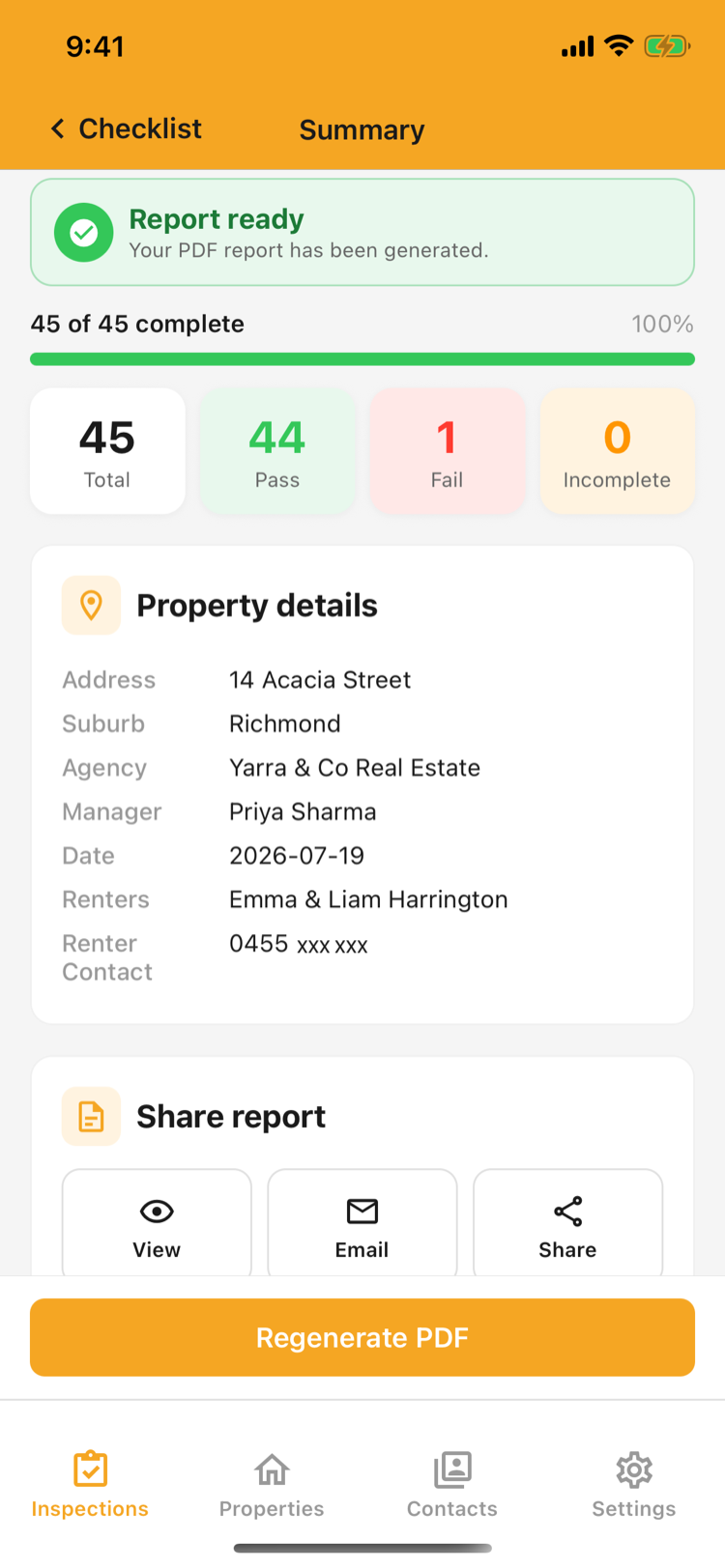
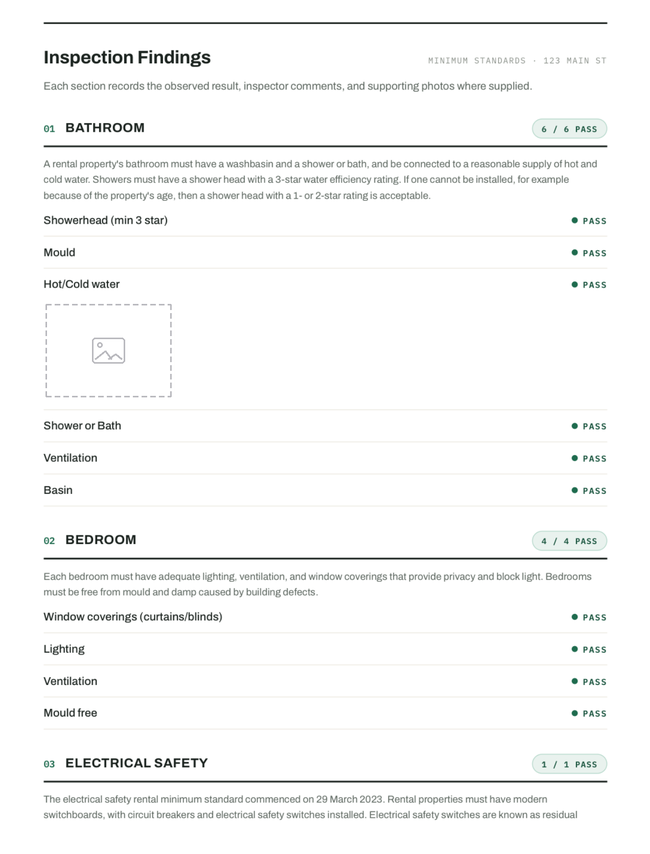
Generated PDF inspection report showing pass results for each minimum standard
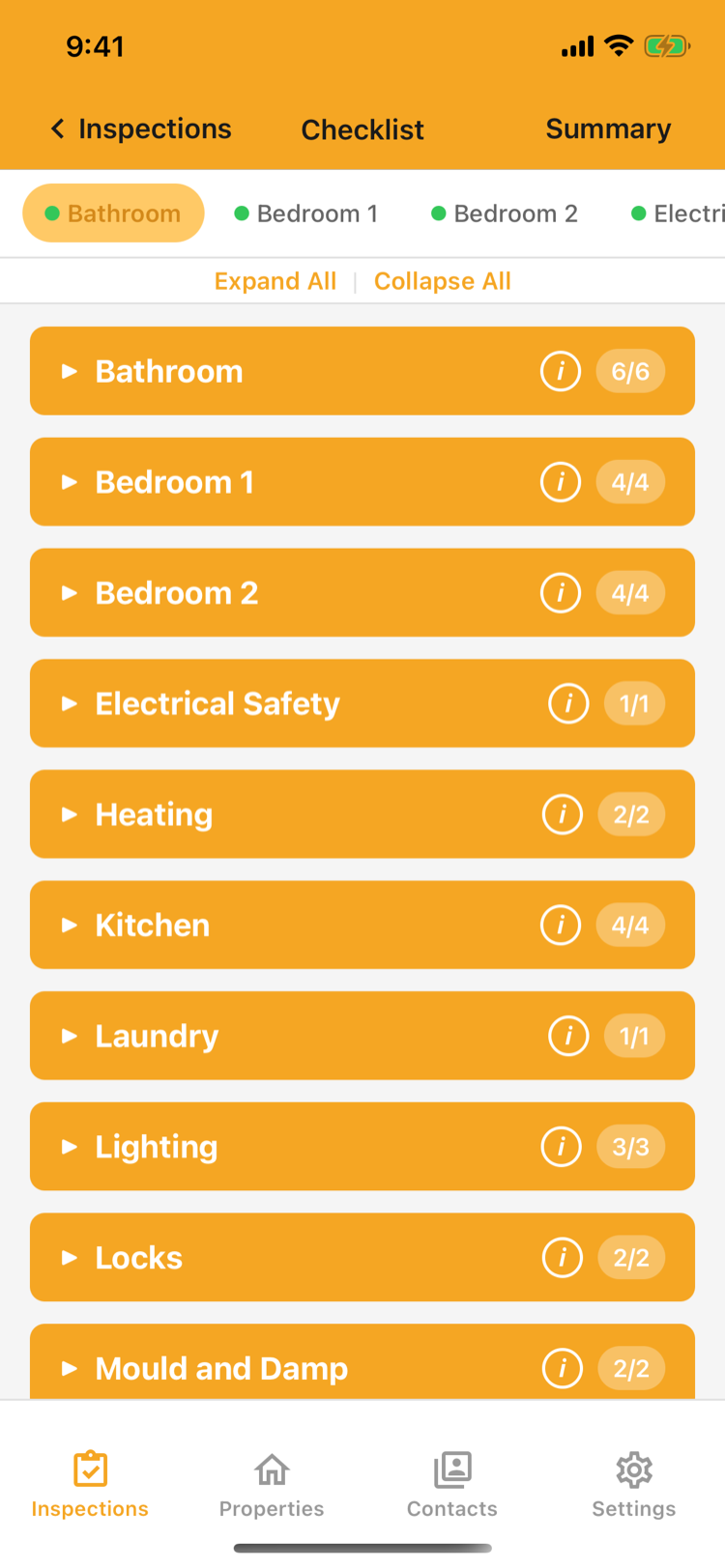
Checklist screen of the Minimum Standards Checklist app showing standards categories with progress counters
15prescribed standards covered
+6energy efficiency standards for 2027, ready to assess now
100%offline, works anywhere, even with no signal
0thumb-typing, dictate comments as you walk

Everything you need on site

From front door to final report

Complete checklist coverage

Every prescribed minimum standard, organised room by room: bathrooms, bedrooms, kitchen, laundry, heating, electrical safety and more. Each item reflects the relevant Victorian minimum-standard requirement so you know what is being assessed.

Built around your property

Set up each inspection to match the home. Add extra bathrooms, bedrooms, ensuites and kitchens with a tap, and the checklist adjusts automatically.

Photo & video evidence

Attach multiple photos to any checklist item, straight from the camera. Record video of smoke alarm tests so there's no arguing with the result.

Dictate, don't type

Keep moving while you talk. Speak your comments straight into any checklist item and watch them appear as text, no thumb-typing in hallways required.

Made for iPhone and iPad

The complete app on both devices: the same checklists, camera capture and PDF reports, with layouts that make the most of the iPad's bigger screen.

Professional PDF reports

Generate polished, branded inspection reports in seconds. Choose between two templates, add your logo, business name and ABN, and set your own accent colour.

Share instantly

Email the finished report to the rental provider, agency or renter directly from the app, or share it anywhere with the native share sheet.

Properties & contacts, organised

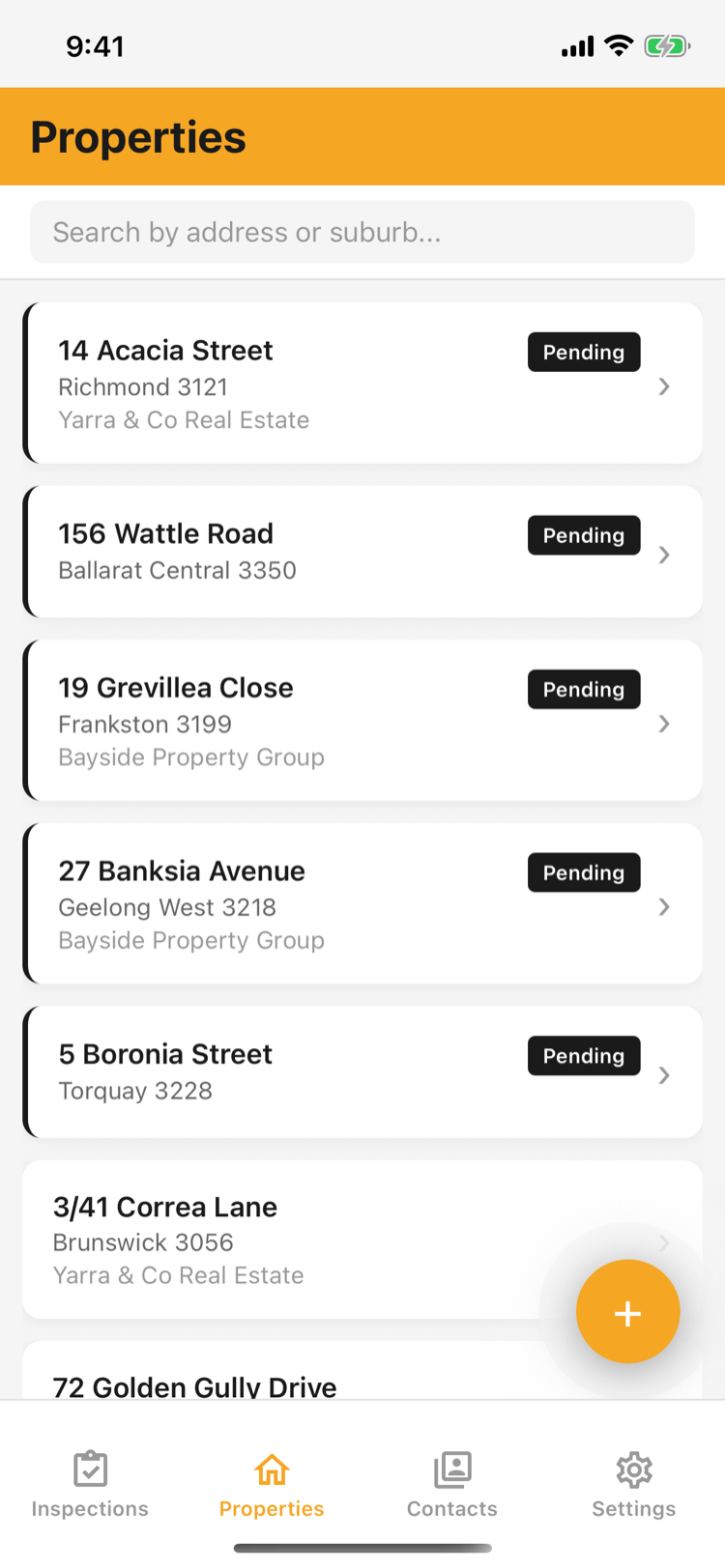
Keep your portfolio in one place: properties with their agencies and property managers, searchable by address or suburb, with inspection history at a glance.

Works completely offline

No signal in the back rooms, basement or garage? No problem. Checklists, photos and reports all work with zero internet connection.

Simple by design

Four steps to a finished report

Complete the checklist. Generate the report. Send it where it needs to go. Work through the inspection on-site, generate the completed PDF report, then export or share it with your property manager, client or preferred record-keeping system.

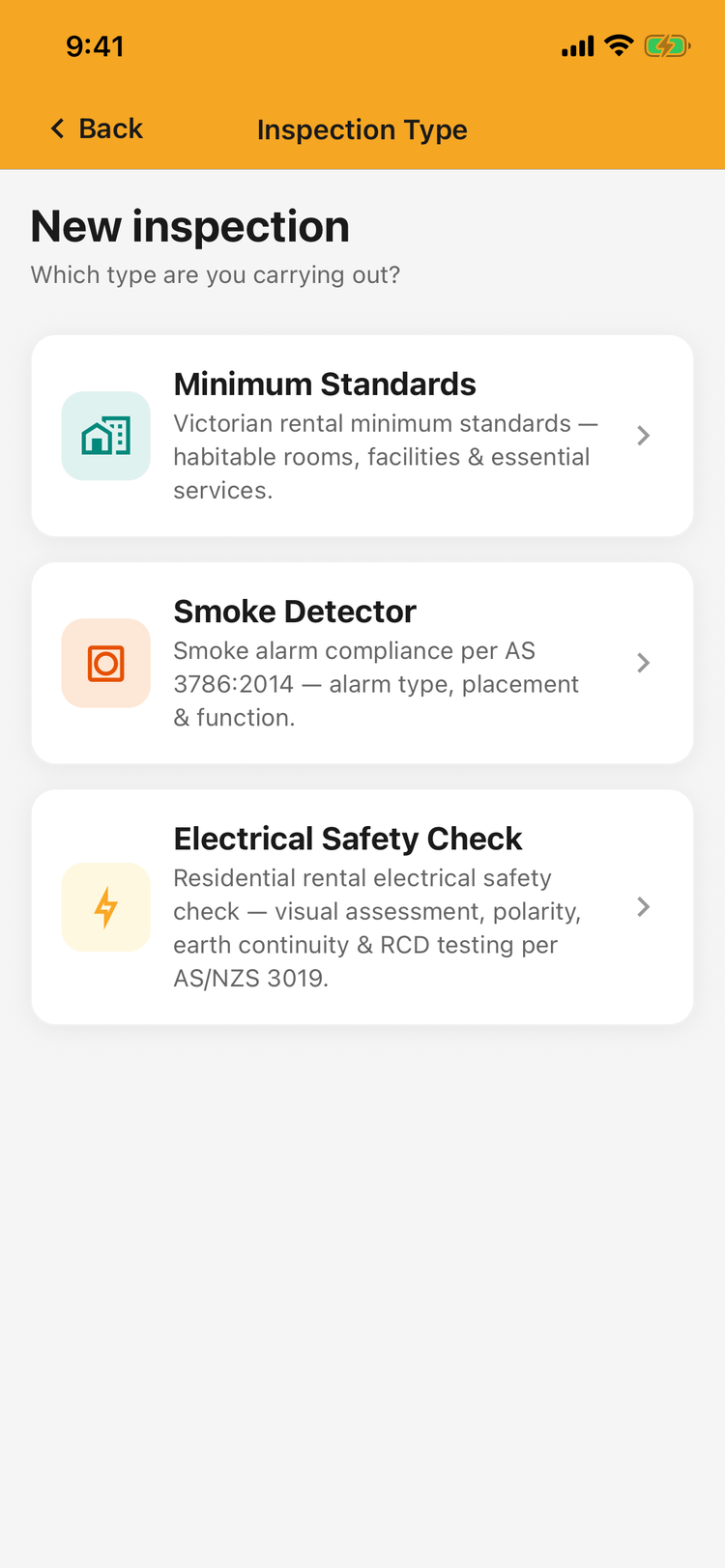
Properties screen with saved properties and pending inspections Inspection type selection: Minimum Standards, Smoke Detector or Electrical Safety Check Checklist screen with standards categories and progress counters Inspection summary showing all checks complete and a generated PDF report

Your portfolio, organised

1

Add the property

Address, agency and renter details, entered once and reused for every inspection.

2

Choose the report

Pick a report type from the library, then tailor the rooms to match the home.

3

Walk the checklist

Pass or fail each item, dictate comments hands-free, and capture photo evidence as you go.

4

Send the report

Export a branded PDF and email it on the spot, before you've left the driveway.

Residential Tenancies Regulations 2021

Every prescribed standard, covered

Victorian rental properties must meet 15 categories of minimum standards. The app walks you through all of them, including the window covering anchor standard introduced in December 2025.

  • Bathrooms
  • Electrical safety
  • Heating
  • Kitchen
  • Laundry
  • Lighting
  • Locks
  • Mould & damp
  • Structural soundness
  • Toilets
  • Ventilation
  • Vermin-proof bins
  • Windows
  • Window coverings
  • Window covering anchors

New to the standards? Read the plain-English guide to all 15 minimum standards or grab the free printable checklist.

Checklist content is based on the minimum standards published by Consumer Affairs Victoria.

Starting 1 March and 1 July 2027

The 2027 standards are already in the app

Victoria's rental energy efficiency standards start applying next year, and most of the fixes need a trade and some lead time. Switch the new checks on for any Minimum Standards inspection and see where a property stands today. It's optional, and today's result stays exactly as it is.

From 1 March 2027

Five standards

  • Showerheads4-star water efficiency
  • HeatingEnergy-efficient fixed heater
  • CoolingFixed cooler in the main living area
  • Hot waterHeat pump or solar water heater
  • Ceiling insulationWhole ceiling insulated
From 1 July 2027

One more

  • DraughtproofingExternal doors, windows and wall vents sealed
The new checks sit in the same checklist, marked with their start date

Optional, one switch per start date

Off by default. Turn it on when you set up a Minimum Standards inspection, or choose your own default in Settings.

Clearly marked as upcoming

Every new check carries a blue date pill, so nobody on site mistakes a 2027 requirement for one that applies today.

Reported on their own

Upcoming results print in a separate block of the PDF and stay out of the totals. The current 15 standards are assessed exactly as before.

From each start date, nothing to switch on. The new checks become part of every inspection dated on or after it.

Read the guide to the 2027 energy efficiency standards

Several of these standards apply only to rental agreements entered into from the start date, and exemptions apply. The app is a report-generation tool and doesn't replace professional or legal advice.

Report types

Three inspection reports, one workflow

Minimum Standards is a key requirement for Victorian rental properties and one of three report types available in the app. Smoke Detector and Electrical Safety Check each stand on their own, with their own checklist, their own standard and their own branded PDF. Whichever you're carrying out, it's the same room-by-room, fully offline, checklist-to-PDF workflow.

Minimum Standards In the app 2027 standards included

The complete room-by-room checklist covering all 15 prescribed minimum standards under the Residential Tenancies Regulations 2021. Each item reflects the relevant Victorian minimum-standard requirement so you know what is being assessed. The 2027 energy efficiency standards are built in too: switch them on to assess a property early, reported separately from today's result.

See every standard covered See the 2027 standards

Smoke Detector In the app

Record visual, battery and alarm test results for smoke alarms, with each detector organised by floor and room and optional video evidence of testing. Supports reporting workflows referencing AS 3786:2014.

Read the smoke alarm guide

Electrical Safety Check In the app

Designed to support report generation for electrical safety checks conducted by appropriately licensed or registered professionals, including scope and limitations, visual assessment, polarity and earth continuity testing, RCD results, observations and recommendations. Reports include electrician licence or registration details and a signed certification section.

Read the electrical safety check guide

More on the way In development

We're always looking to add more. New report types are in development and arrive in the same app, with the same offline, on-device privacy.

Inspection type selection screen listing Minimum Standards, Smoke Detector and Electrical Safety Check
Pick a report type when you start an inspection

Private by design

Your inspection data stays under your control

Most inspection apps sync everything to someone else's server. This one doesn't: Minimum Standards Checklist has no account, app cloud or synchronisation server. Inspection data is stored locally in an encrypted database and is not uploaded to SWBM.

Encrypted database

Your inspection data is stored in an encrypted database (SQLCipher, AES-256), unreadable without its key. Photos, videos and PDF reports are files protected by your device passcode.

Keys in the iOS Keychain

The encryption key is generated on your device and protected by the iOS Keychain, Apple's hardware-backed secure storage. It is never sent to us.

Zero tracking

No analytics, no advertising SDKs, no trackers, no telemetry. The app doesn't phone home, because there's no home to phone.

No account required

No sign-up, no email address, no password. Download the app and start inspecting. You are not the product.

You control what you share

Reports leave the app when you deliberately export or share them. Apple device backups may separately include app data according to your iOS and Apple backup settings.

Erase everything, any time

A single control wipes every inspection, photo, report and the encryption key itself. Your data, your call. Permanently.

Questions, answered

Frequently asked questions

Who is the app for?

Rental providers (landlords) self-managing their properties, property managers, and trades or inspection professionals who complete minimum standards, smoke alarm and electrical safety checks on Victorian rental properties.

Does it cover the official Victorian minimum standards?

Yes. The checklists are built around the 15 categories of rental minimum standards prescribed by the Residential Tenancies Regulations 2021. Each item reflects the relevant Victorian minimum-standard requirement so you know what is being assessed. The app is a report-generation tool and doesn't replace professional or legal advice where you need it.

Does the app cover the 2027 energy efficiency standards?

Yes. The six energy efficiency standards that start on 1 March and 1 July 2027 are built into the Minimum Standards report. Until each start date you can switch them on for any inspection to see how a property measures up. They're marked as upcoming on the checklist and reported separately from the current standards.

Do I have to assess against the 2027 standards now?

No. It's optional and off by default. Turn it on for a single inspection at setup, or make it your default in Settings.

What happens on 1 March 2027?

The standards that start that day become part of every Minimum Standards inspection dated on or after it, with nothing to switch on. Inspections you've already started don't change. Keep the app up to date so it carries the current standards.

Do I need an internet connection?

No. The entire app, including checklists, photos, video and PDF generation, works completely offline. You only need a connection if you choose to email a finished report.

Where is my inspection data stored?

Inspection data is stored locally in an encrypted database on your device while you use the app to create and manage reports. Photos, videos and PDF reports are stored as files on your device, protected by your device passcode. The app has no cloud service, sync server or account, and does not upload your inspection data to SWBM. Apple device backups are handled separately according to your iOS and Apple backup settings.

What should I do with a completed report?

Once a report is complete, export or share the PDF and retain it in the property management, client, business or other record-keeping system appropriate to your circumstances. The app is designed to generate reports, not to act as your permanent system of record.

Can I brand the reports with my business details?

Yes. Add your business name, logo and ABN/ACN, pick from two report templates, and set your own accent colour and footer text. Reports look like yours, not ours.

What does the Smoke Detector report check?

Record visual, battery and alarm test results for smoke alarms, with each detector organised by floor and room and optional video evidence of testing. Supports reporting workflows referencing AS 3786:2014.

What does the Electrical Safety Check cover?

Designed to support report generation for electrical safety checks conducted by appropriately licensed or registered professionals, including scope and limitations, visual assessment, polarity and earth continuity testing, RCD results, observations and recommendations. Reports include electrician licence or registration details and a signed certification section.

Will more report types be added?

Yes. Minimum Standards, Smoke Detector and Electrical Safety Check are all in the app today, and we're always looking to add more. New inspection types are in development and will appear in the same app, with the same offline, on-device approach.
Ready for your next inspection?

Download Minimum Standards Checklist and finish your next report before you leave the property.